One line in the candidate instructions for the Linux Foundation Certified System Administrator exam tells you more about it than any brochure: do not reboot the base system, because rebooting it will not restart your exam environment. That is not the kind of warning a multiple choice test needs. LFCS hands you a working Linux desktop, a terminal and a list of problems, and it scores what you actually change on real machines.
That is why so many people search for LFCS questions and come away confused. There is no bank of questions to memorise. There are 17 to 20 performance-based tasks, two hours, and a pass mark of 67 percent. This article walks through how a task works from the first line to the last, what each of the five weighted domains asks you to do, how LFCS compares with Red Hat’s RHCSA, what the $445 fee includes, and a preparation order built around typing rather than reading.
Table of Contents
- What Is the Linux Foundation Certified System Administrator Exam?
- How Do the 17 to 20 LFCS Tasks Actually Work?
- How Is the LFCS Syllabus Weighted?
- Why Do Operations Deployment and Networking Carry Half the Marks?
- What Do Storage, Essential Commands and Users and Groups Ask?
- Which Linux Distribution Does the LFCS Exam Use?
- LFCS or RHCSA: Which Hands-On Exam Fits You?
- What Does the LFCS Fee Include?
- How Should You Prepare for the LFCS Exam?
- Where LFCS Leads After You Pass
- Frequently Asked Questions
- Conclusion
What Is the Linux Foundation Certified System Administrator Exam?
The Linux Foundation Certified System Administrator exam, code LFCS, is a vendor-neutral, online, proctored test of everyday Linux administration. Instead of answering questions, you solve 17 to 20 tasks on live hosts from the command line within 2 hours, and you need 67 percent to pass. The exam costs $445, has no prerequisites, and the certification stays valid for two years.
The Linux Foundation pitches it at an intermediate level: someone who already runs Linux systems and wants a credential that proves it without tying them to one vendor’s distribution. Its own LFCS certification page lists the full set of domains and competencies, and every figure below matches it.
| Exam detail | LFCS |
|---|---|
| Full name | Linux Foundation Certified System Administrator |
| Exam code | LFCS |
| Format | Online, proctored, performance-based tasks on the command line |
| Number of tasks | 17 to 20 |
| Duration | 120 minutes |
| Passing score | 67% |
| Price | $445 USD, exam only |
| Prerequisites | None |
| Validity | 2 years |
| Recommended training | Linux System Administration Essentials (LFS207) |
How Do the 17 to 20 LFCS Tasks Actually Work?
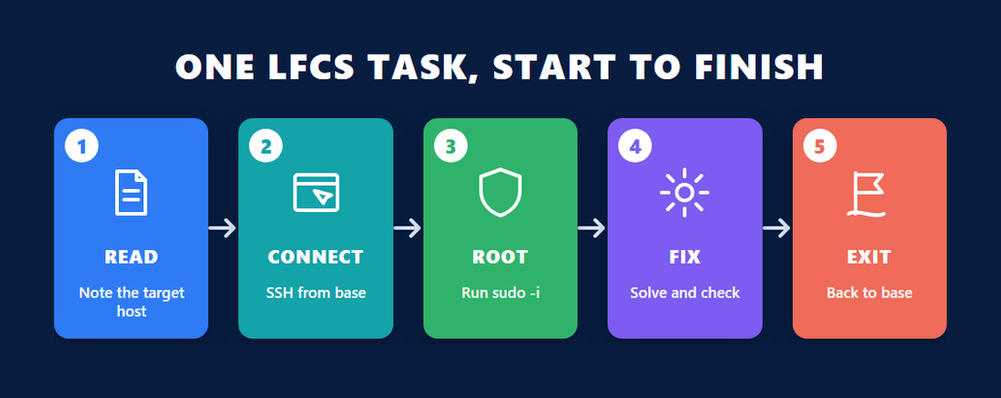
Each LFCS task is a short problem tied to a named host. You read the task, connect to that host over SSH from the base system, gain root with sudo, make the change, confirm it works, and exit back to base before the next task. The 17 to 20 tasks are scored on the end state of each machine, and 67 percent of the marks is the pass line.
The detail matters because the exam environment has rules that a careless habit can break. The Linux Foundation’s candidate instructions for LFCS spell them out, and they are worth reading before exam day, not during it.
The base system and the task hosts
You start on a machine called base. An infobox at the top of every task names the host where the work must happen, and you reach it with a command such as ssh followed by the node name. Nested SSH is not supported, so you always return to base first and then connect to the next host. The base system deliberately has none of the editors installed, which is a gentle push to do the work where it belongs.
- Every task host comes with Emacs, Git, Nano, Sudo and vim already installed and configured.
- You can become root on any host with
sudo -i, or run single commands through sudo. - You must not block incoming ports 8080, 4505 and 4506, including through a distribution’s default firewall configuration, and you must not stop the process that runs the exam terminal.
- In the remote desktop terminal, copy and paste use Ctrl+Shift+C and Ctrl+Shift+V, and Ctrl+Alt+W replaces Ctrl+W.
That last point sounds trivial until a reflexive Ctrl+W closes a browser tab halfway through a task. Practising on a setup that mirrors the real one removes that kind of surprise, which is where an LFCS practice exam earns its place alongside hands-on lab time.
What you can and cannot look up
Resources are limited to what you can reach from inside the exam terminal: man pages, the documentation a distribution installs under /usr/share and its subdirectories, and packages that belong to the distribution. Nothing outside the terminal is allowed. Installing packages is not required to finish any task, but if you choose to, the instructions recommend knowing the standard package managers apt, dpkg, dnf and yum.
How Is the LFCS Syllabus Weighted?
The LFCS syllabus has five weighted domains: Operations Deployment and Networking at 25 percent each, Storage and Essential Commands at 20 percent each, and Users and Groups at 10 percent. Together they hold 34 named competencies, from kernel parameters and SELinux to LVM, static routing, Git basics and LDAP accounts. Half of the exam sits in the first two domains.
| Domain | Weight | Competencies |
|---|---|---|
| Operations Deployment | 25% | 8 |
| Networking | 25% | 8 |
| Storage | 20% | 7 |
| Essential Commands | 20% | 6 |
| Users and Groups | 10% | 5 |
The weights tell you where the marks are, but not how many tasks each domain gets. The Linux Foundation publishes no task count per domain, so plan by weight: Networking weighs two and a half times as much as Users and Groups.
Why Do Operations Deployment and Networking Carry Half the Marks?
Operations Deployment and Networking are each worth 25 percent of the LFCS exam because they cover the work a Linux administrator does every week: keeping services, packages, containers and virtual machines running, and keeping hosts reachable, routed and secured. Between them they list 16 competencies, so most of your practice time belongs here.
Operations Deployment, 25 percent
This domain is the broadest in the exam. Its eight competencies are:
- Configure kernel parameters, persistent and non-persistent
- Diagnose, identify, manage, and troubleshoot processes and services
- Manage or schedule jobs for executing commands
- Search for, install, validate, and maintain software packages or repositories
- Recover from hardware, operating system, or filesystem failures
- Manage Virtual Machines (libvirt)
- Configure container engines, create and manage containers
- Create and enforce MAC using SELinux
The phrase persistent and non-persistent is the trap in the first item. Setting a value for the running kernel and making it survive a restart are two separate jobs, and the kernel’s own sysctl kernel documentation is the clearest reference for what each tunable under /proc/sys/kernel actually does.
SELinux is the other item that catches people who have spent their careers on systems where it was switched off. Mandatory access control means labels, booleans and policy, not just file permissions. The SELinux userland project is where the libraries and tools that distributions ship are maintained.
Networking, 25 percent
Networking asks you to make hosts talk to each other correctly and safely:
- Configure IPv4 and IPv6 networking and hostname resolution
- Set and synchronize system time using time servers
- Monitor and troubleshoot networking
- Configure the OpenSSH server and client
- Configure packet filtering, port redirection, and NAT
- Configure static routing
- Configure bridge and bonding devices
- Implement reverse proxies and load balancers
Packet filtering deserves extra care because of the port rule in the exam instructions. A firewall task done too aggressively can block the ports the exam itself relies on, so practise writing rules that do exactly what the task asks and nothing broader.
What Do Storage, Essential Commands and Users and Groups Ask?
The remaining 50 percent of LFCS splits into Storage at 20 percent, Essential Commands at 20 percent and Users and Groups at 10 percent. Storage is about volumes, filesystems, swap and mounts; Essential Commands mixes Git, services, performance and SSL certificates; Users and Groups covers accounts, environment profiles, limits, ACLs and LDAP.
Storage, 20 percent
- Configure and manage LVM storage
- Manage and configure the virtual file system
- Create, manage, and troubleshoot filesystems
- Use remote filesystems and network block devices
- Configure and manage swap space
- Configure filesystem automounters
- Monitor storage performance
LVM and mounts reward the same habit as kernel parameters: a change that works now but is gone after the next boot is half a change. Get used to checking that your fstab entries and volume layout are written down, not just active.
Essential Commands, 20 percent
- Basic Git Operations
- Create, configure, and troubleshoot services
- Monitor and troubleshoot system performance and services
- Determine application and service specific constraints
- Troubleshoot diskspace issues
- Work with SSL certificates
Git and SSL certificates look out of place in a sysadmin exam until you remember how much configuration now lives in repositories and how many services refuse to start over a bad certificate.
Users and Groups, 10 percent
- Create and manage local user and group accounts
- Manage personal and system-wide environment profiles
- Configure user resource limits
- Configure and manage ACLs
- Configure the system to use LDAP user and group accounts
It is the smallest domain, but LDAP integration is the one item here that many administrators have never configured by hand. Spend an evening on it.
Which Linux Distribution Does the LFCS Exam Use?
LFCS is independent of distribution-specific tasks. Since the Linux Foundation updated the exam on 11 May 2023, candidates no longer choose a platform in the exam preparation checklist, and the tasks are written so that general Linux skill solves them. What matters is knowing the standard tools well, not one vendor’s wrappers around them.
The Linux Foundation explained the change in its LFCS update announcement, which also introduced the current domain list. In practice, this means you should be comfortable on both a Debian style and a Red Hat style system. The allowed resources hint at the same thing: the instructions mention apt and dpkg alongside dnf and yum.
LFCS or RHCSA: Which Hands-On Exam Fits You?
LFCS and Red Hat’s RHCSA are both performance-based Linux administration exams, so the choice is about scope rather than difficulty style. LFCS is vendor-neutral and distribution independent. RHCSA, exam EX200, is built on the skills that underpin system administration across Red Hat products, so it suits people who work mainly on Red Hat Enterprise Linux.
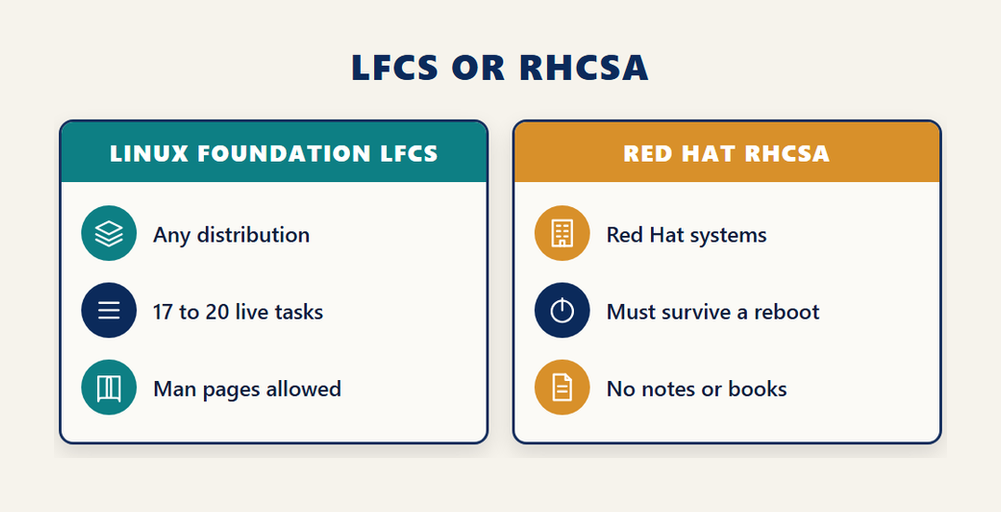
Red Hat describes the RHCSA EX200 exam as a hands-on, practical test of real-world tasks, where configurations must persist after a reboot without intervention and notes and books are not allowed. The two exams overlap heavily in what they ask you to do at the keyboard; they differ in whose platform they certify.
- Pick LFCS if you administer a mix of distributions, work in cloud or container environments, or want a credential that does not depend on one vendor.
- Pick RHCSA if your employer standardises on Red Hat Enterprise Linux and asks for Red Hat credentials by name.
Neither choice wastes effort. The underlying skills, services, storage, networking, users and security policy, transfer directly between the two.
What Does the LFCS Fee Include?
The LFCS exam costs $445 on its own. That price covers 12 months to schedule and sit the exam, two exam attempts so one retake is included, two sessions on an exam simulator, a PDF certificate and digital badge, and a certification valid for two years. Bundles add a subscription or the LFS207 course for a higher price.
| Option | Price | What you get |
|---|---|---|
| Exam only | $445 | Exam, one retake, two simulator sessions |
| Exam with THRIVE-ONE annual subscription | $625 | Exam plus a year of access to the e-learning catalogue |
| Exam with LFS207 course | $645 | Exam plus Linux System Administration Essentials |
The Killer.sh simulator
Enrolment unlocks an exam simulator provided by Killer.sh. You get two simulation attempts, each with 36 hours of access from the moment you activate it. The simulator holds 20 to 25 questions that are identical for every attempt and every user, unlike the real exam, and it returns graded results. Treat it as a rehearsal of the environment rather than a preview of the tasks.
If you want background on how LFCS fits a wider career in Linux administration, our earlier look at LFCS and sysadmin careers covers the career side that this article leaves aside.
How Should You Prepare for the LFCS Exam?
Prepare for LFCS by doing, not reading. Build two lab machines from different distribution families, work through every competency by weight, practise making each change survive a reboot, rehearse the exam’s SSH and sudo workflow, then use the simulator to test your speed. The clock is part of what you practise: 120 minutes covers all 17 to 20 tasks.
- Set up two practice virtual machines, one Debian style and one Red Hat style, so no tool or package manager surprises you.
- Work through the 25 percent domains first, Operations Deployment and Networking, then Storage and Essential Commands, then Users and Groups.
- Reboot after every practice change and confirm it is still there, because persistent configuration is a recurring theme across kernel parameters, mounts and services.
- Practise the exam routine of reading a task, connecting to the named host over SSH, running sudo -i, solving, checking and exiting back to base.
- Learn to find answers in man pages and /usr/share/doc quickly, since those are the only references you will have.
- Use the first Killer.sh session about two weeks before your exam date and the second a few days before, and fix every weak area it exposes.
Time is the hidden constraint. Skip a task that is not yielding after a few minutes, finish the ones you know, and come back. Leaving a hard task to the end protects the time you need for the ones you can finish.
Where LFCS Leads After You Pass
LFCS is a foundation credential, and the most common next step is into Kubernetes. The Linux Foundation’s performance-based Kubernetes exams use the same style of live terminal tasks, so the habits you build for LFCS, working fast on remote hosts and checking your results, carry straight over.
Administrators who move on to container platforms often aim at Kubernetes security next, and our guide to the CKS Kubernetes security exam explains what that later step involves. Remember that LFCS itself is valid for two years, so plan the renewal of your foundation credential alongside any new ones.
Frequently Asked Questions
How many questions are on the LFCS exam?
LFCS has no multiple choice questions. It consists of 17 to 20 performance-based tasks that you solve on live Linux hosts from the command line within 120 minutes.
What is the LFCS passing score?
You need a score of 67 percent or above to pass the Linux Foundation Certified System Administrator exam.
How much does the LFCS exam cost?
The exam alone costs $445. A bundle with the THRIVE-ONE annual subscription costs $625, and a bundle with the LFS207 course costs $645.
Does the LFCS fee include a retake?
Yes. The purchase includes two exam attempts, so one retake is covered, and you have 12 months to schedule and take the exam.
Which Linux distribution is used in the LFCS exam?
The exam is independent of distribution-specific tasks, and since the May 2023 update you no longer choose a platform. Being comfortable with both apt and dnf style systems is sensible preparation.
Is LFCS better than RHCSA?
Neither is better in general. LFCS is vendor-neutral and distribution independent, while RHCSA centres on Red Hat systems. Choose the one that matches the platforms you work on and the credentials employers ask for.
What resources can I use during the LFCS exam?
Only resources reachable from the exam terminal: man pages, documentation installed under /usr/share, and packages that are part of the distribution.
How long is the LFCS certification valid?
The Linux Foundation Certified System Administrator certification is valid for two years.
Does LFCS come with a practice simulator?
Yes. Enrolment includes two Killer.sh simulator sessions with 36 hours of access each, using 20 to 25 fixed questions with graded results.
Conclusion
The Linux Foundation Certified System Administrator exam is a working session, not a quiz. You get 17 to 20 tasks, two hours, and live hosts, and you need 67 percent of the marks. Half of them come from Operations Deployment and Networking, and persistent configuration runs through every domain. The $445 fee covers a retake, two simulator sessions and a credential valid for two years, on any distribution you like.
So prepare the way the exam is scored. Build two lab machines, work through the competencies by weight, reboot to check your changes, and rehearse the SSH and sudo routine until it is automatic. Then book the exam with time in hand to use your retake if you need it.


