Most candidates prepare for EX200 as though questions were waiting for them. They memorise command flags, drill option lists, and arrive expecting a screen of radio buttons. That preparation is aimed at the wrong exam. The Red Hat Certified System Administrator (RHCSA) exam is delivered as a live Red Hat Enterprise Linux system with tasks to complete, and nothing you know counts until the system itself shows it working.
That single fact reshapes what the objective list means. Every line on the RHCSA exam objectives is written as something you do, not something you recall, and Red Hat adds a condition that catches people out: whatever you configure has to survive a reboot on its own. This guide walks the ten objective groups exactly as Red Hat and the published syllabus name them, explains which of them your daily work already covers, and sets out how to rehearse the rest on a system rather than on paper.
What Are the RHCSA Exam Objectives?
The RHCSA exam objectives are ten groups of practical system administration tasks that EX200 asks you to perform on a live Red Hat Enterprise Linux system. They run from shell fundamentals and software management through storage, file systems, networking, users and groups, and finish with SELinux and firewall configuration under the heading Manage security.
The published syllabus lists them without percentage weightings. That is unusual, and it is deliberate: a performance-based exam does not divide neatly into marks per topic the way a question paper does. You are given tasks, and each task may touch two or three objective groups at once. Creating a logical volume, mounting it by UUID at boot, and setting the right SELinux context on it is one piece of work that draws on three separate groups.
| Objective group | Representative tasks it covers |
|---|---|
| Understand and use essential tools | Shell syntax, input and output redirection, grep and regular expressions, SSH access, tar and gzip archives, file and directory operations, hard and soft links, ugo/rwx permissions, system documentation |
| Manage software | Configuring access to RPM repositories, installing and removing RPM packages, configuring access to Flatpak repositories, installing and removing Flatpak packages |
| Create simple shell scripts | Conditional execution with if and test, looping constructs, processing script inputs, capturing the output of commands inside a script |
| Operate running systems | Booting and rebooting, booting into different targets, interrupting the boot process, identifying and killing intensive processes, adjusting scheduling, tuning profiles, logs and journals, service status, secure file transfer |
| Configure local storage | Partitions on MBR and GPT disks, physical volumes, volume groups, logical volumes, mounting by UUID or label at boot, adding partitions, logical volumes and swap non destructively |
| Create and configure file systems | vfat, ext4 and xfs file systems, NFS mounts, autofs, extending logical volumes, set-GID directories for collaboration, diagnosing permission problems |
| Deploy, configure, and maintain systems | Scheduling with at and cron, enabling services at boot, booting into a specific target automatically, time service clients, installing updates from the Red Hat Content Delivery Network or a local source, modifying the bootloader |
| Manage basic networking | IPv4 and IPv6 addressing, hostname resolution, starting network services at boot, restricting access with firewalld and firewall-cmd |
| Manage users and groups | Creating, deleting and modifying local accounts, passwords and password aging, local groups and memberships, configuring superuser access |
| Manage security | Firewall settings through firewall-cmd, default file permissions, key based SSH authentication, SELinux enforcing and permissive modes, file and process contexts, restoring default contexts, port labels, boolean settings |
Read that table as a list of things to be able to do at a prompt, without notes, on an unfamiliar machine. That is the standard the exam applies.
Is the RHCSA a Written Exam or a Practical One?
It is entirely practical. Red Hat describes EX200 as a hands-on exam that requires candidates to undertake real-world tasks, and there is no written component at all. You are given a system, a set of requirements, and a fixed amount of time. Grading is automated against the state of the machine when your session ends.
Three consequences follow, and each one changes how you should revise.
- Partial knowledge earns nothing. Knowing that a setting exists but not where it lives produces an unconfigured system, which scores the same as an untouched one.
- Speed matters in a way it does not on a question paper. There is no skipping ahead to easy marks and coming back; every task costs real minutes at a terminal.
- Verification is part of the work. Since the machine is what gets graded, checking your own result is not optional polish, it is the only way to know you have scored.
Red Hat is also strict about what you may bring. Internet access is not provided, and no hard copy or electronic documentation is permitted, including notes and books. The documentation that ships with the product remains available, which is a meaningful concession: man pages and the files under the shipped documentation tree are on the system and are fair game. Learning to navigate them quickly is itself an exam skill, which is why the first objective group ends with locating and interpreting system documentation.
How Are the Ten Objective Groups Split?
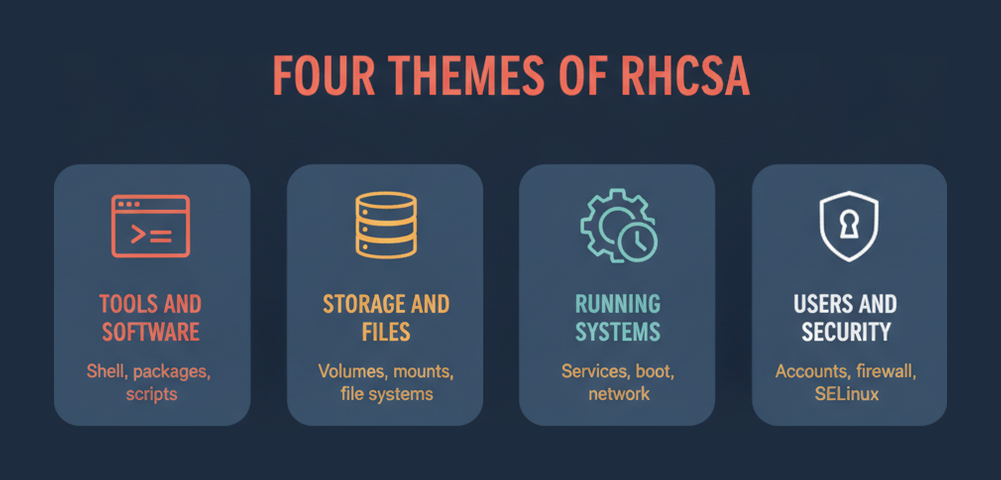
They split cleanly into four themes: working at the shell, putting storage together, running and maintaining the system, and locking it down. No published weighting says how many tasks come from each, so treating the four themes as roughly equal claims on your study time is the safest planning assumption. Administrators who run Oracle’s RHEL compatible distribution instead can compare this task list with the Oracle Linux administrator exam.
| Theme | Objective groups it contains | What the exam is really testing |
|---|---|---|
| Shell and software | Essential tools, Manage software, Create simple shell scripts | Whether you are fluent enough at a prompt to work without hesitation |
| Storage and file systems | Configure local storage, Create and configure file systems | Whether you can build a stack from disk to mount point and make it come back after a reboot |
| Running systems | Operate running systems, Deploy configure and maintain systems, Manage basic networking | Whether you can control what starts, when it starts, and how the machine reaches the network |
| Identity and security | Manage users and groups, Manage security | Whether you can grant access precisely and leave SELinux enforcing rather than switching it off |
The storage theme deserves particular respect. It is the one area where a small error compounds: a volume group built on the wrong physical volume, or a mount entry written without a UUID, produces a system that looks correct until it restarts. Rehearsing the whole chain against the objectives on EX200 exam preparation material is a faster way to find those gaps than reading about them.
Which Objectives Does Daily RHEL Work Already Cover?
For most working administrators, roughly half the objective list is already routine and the other half is not. Shell work, package installation, service management and user administration tend to be daily habits. Storage construction, SELinux context repair, autofs and shell scripting are the areas that people either use constantly or have never touched.
Usually already covered
If you administer RHEL for a living, the essential tools group, most of managing software, and the bulk of users and groups will feel like description rather than instruction. Service enablement, log inspection and basic firewall rules usually sit in the same category. Revising these is a matter of confirming syntax under time pressure, not learning anything new.
The reliable weak spots
Three areas catch experienced people out repeatedly.
- Logical volume management end to end. Plenty of administrators inherit volumes rather than build them, so creating a physical volume, assigning it to a volume group, carving a logical volume and extending it later is unfamiliar in practice even when it is familiar in theory.
- SELinux beyond switching modes. The objectives ask for file and process contexts, restoring default contexts, port labels and boolean settings. Setting the system permissive is not an answer, and on a graded machine it is a visible failure. The upstream SELinux kernel documentation is the clearest reference for what those contexts and booleans actually control.
- Shell scripting. The requirement is modest, covering conditionals, loops, positional parameters and command substitution, but administrators who work interactively rather than in scripts often have not written one from scratch in years.
An honest audit against the objective table is worth more than any study plan. Mark each of the ten groups as fluent, rusty or unseen, and the rusty and unseen entries become the entire revision list.
What Does Persistence After Reboot Actually Demand?
Red Hat states that on all of its performance-based exams, configurations must persist after a reboot without intervention. In practice that means a change made only in memory scores zero, however correct it looked at the time. The graded artefact is the system as it comes back up, not the system as you left it.
This rule quietly rewrites several objectives. Setting an IP address with a live command is not the same as configuring it to be there after a restart. Mounting a file system by hand is not the same as writing a persistent entry keyed to a UUID or label, which is exactly why the storage objective specifies mounting at boot by universally unique ID or label rather than simply mounting. Enabling a service for the current session is not the same as configuring it to start at boot, which is why the maintenance group separates starting a service from configuring it to start automatically.
The habit worth building is simple and slightly uncomfortable: reboot during practice, on purpose, before you believe a task is finished. Candidates who only reboot at the end of a practice session discover several broken tasks at once and have no time left to trace which change caused which failure.
Why Does the RHEL 10 Version Matter?
Red Hat states that the current EX200 exam is based on Red Hat Enterprise Linux 10. Version matters here more than on a knowledge exam, because you are working in a real environment: default tools, package behaviour and command availability are whatever the shipped release provides, not whatever your production estate happens to run.
The clearest example sits in the software objective. Alongside configuring access to RPM repositories and installing RPM packages, the syllabus now asks for configuring access to Flatpak repositories and installing and removing Flatpak packages. An administrator whose experience stops at earlier releases may never have handled Flatpak on a server at all, and it is not something you can bluff at a prompt.
The practical instruction is to practise on the release the exam targets. Rehearsing on an older RHEL build, or on a downstream rebuild that lags behind, risks muscle memory that produces the right idea and the wrong command. Where your workplace estate is older, a lab virtual machine on the current release is the difference between recognising an environment and meeting it for the first time under a clock.
What Are the EX200 Exam Details?
EX200 runs for 150 minutes, contains 20 items, and is passed at 210 out of 300. The fee is $400 US dollars and scheduling runs through Pearson VUE. Those numbers reframe the objective list immediately: ten groups of tasks compressed into two and a half hours leaves very little room for hesitation.
| Detail | Value |
|---|---|
| Exam name | Red Hat Certified System Administrator (RHCSA) |
| Exam code | EX200 |
| Items | 20 |
| Duration | 150 minutes |
| Passing score | 210 of 300 |
| Price | $400 USD |
| Scheduling | Pearson VUE |
| Format | Performance based, tasks completed on a live system |
| Platform version | Red Hat Enterprise Linux 10 |
| Recommended training | RH124, RH134, or the RH199 rapid track course |
A score of 210 out of 300 is 70 percent, which sounds forgiving until you remember that tasks are graded on outcome. There is no partial credit for the right approach applied to the wrong device. Budget the 150 minutes deliberately: leave a genuine reserve at the end for a reboot and a verification pass, because the alternative is discovering a non persistent change after the session has closed. Red Hat’s own EX200 exam page is the reference of record for format and objectives.
How Should You Work Through the Objectives?
Work them on a live system in the order the machine builds up, not the order the syllabus prints. Storage before file systems, file systems before services that depend on them, networking before anything remote, and security last so that SELinux and firewall rules are applied to a system that already works. Each step ends with a reboot.
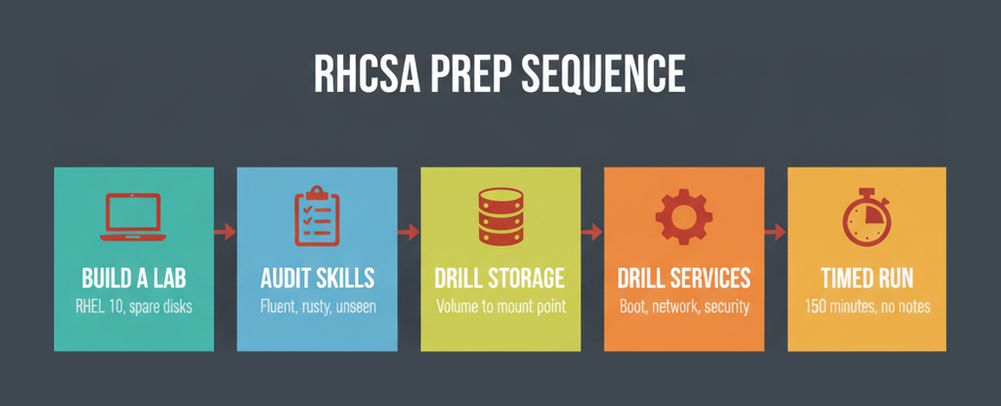
- Build a lab on Red Hat Enterprise Linux 10 with two spare disks attached, because several storage objectives are impossible to rehearse convincingly on a single disk.
- Audit yourself against the ten objective groups honestly, marking each as fluent, rusty or unseen, and treat the rusty and unseen entries as the whole revision list.
- Rehearse the storage chain from physical volume to mounted file system in one continuous run, then reboot and confirm every mount returned without intervention.
- Practise the running systems and networking objectives next, enabling each service and address so that it survives a restart rather than only working in the current session.
- Finish on the security group with SELinux left enforcing throughout, repairing contexts and setting port labels and booleans rather than lowering the mode to make a task pass.
- Run a full timed rehearsal of 150 minutes with no notes and no internet, using only the documentation that ships with the system, and reboot before you call it complete.
The sequence matters because the objectives are interdependent. Practising SELinux contexts on a file system you did not build yourself teaches half the lesson, and the half it omits is the half the exam grades.
Where RHCSA Leads Next
RHCSA is the gateway credential in Red Hat’s programme rather than a terminal one. Red Hat requires it before either engineer-level credential: you must hold RHCSA to become a Red Hat Certified Engineer in Enterprise Linux and to become a Red Hat Certified Engineer in Ansible. Red Hat sets all of this out on its own RHCSA credential page. The credential is also cited by administrators certifying under organisational mandates, including the DoD 8570 directive.
Red Hat names the next step directly, pointing candidates toward Red Hat Linux Automation with Ansible and its associated exam. That progression is coherent: RHCSA proves you can configure one system by hand, and the automation credential proves you can do the same work across many without repeating yourself.
The audience Red Hat describes for EX200 is broader than it first appears. It includes experienced administrators seeking validation, students completing the RH124 and RH134 sequence, lapsed engineers recertifying, and DevOps practitioners who want container fundamentals grounded in real system administration. If you already hold the credential and are weighing the engineer track, our RHCE exam guide covers what changes at that level.
It is worth being clear about why a Linux administration credential still carries weight. Linux remains the dominant platform for professional server and development work, a position the independent Stack Overflow developer survey continues to record year after year. A credential that proves you can operate it under time pressure, without notes, is not a paper qualification.
Frequently Asked Questions
What are the RHCSA exam objectives?
Ten groups of practical tasks: essential tools, managing software, simple shell scripts, operating running systems, local storage, file systems, deploying and maintaining systems, basic networking, users and groups, and managing security including SELinux and firewalld.
Is the RHCSA exam multiple choice?
No. EX200 is performance based. You complete real tasks on a live Red Hat Enterprise Linux system and the machine is graded on its final state, so there are no answer options to select at any point.
How long is the RHCSA exam?
One hundred and fifty minutes for 20 items. That is roughly seven and a half minutes per item, and the budget has to include time to reboot and verify that your configurations came back correctly.
What is the passing score for EX200?
Two hundred and ten out of 300, which works out at 70 percent. Because grading is based on the state of the system, there is no partial credit for a correct method applied to the wrong target.
What version of Red Hat Enterprise Linux is the RHCSA based on?
Red Hat states the current exam is based on Red Hat Enterprise Linux 10. Practising on an older release risks learning commands and defaults that differ from the environment you will actually be given.
How much does the RHCSA exam cost?
Four hundred US dollars, scheduled through Pearson VUE. Red Hat also offers the RH199 rapid track course bundled with the exam for candidates who prefer training and testing as a single package.
Can you use documentation during the RHCSA exam?
Only what ships with the product. Internet access is not provided, and no notes, books or electronic documents may be brought in. Man pages and the installed documentation tree remain available on the system.
Do RHCSA configurations need to survive a reboot?
Yes. Red Hat requires that configurations persist after a reboot without intervention on all performance-based exams, so a change that exists only in the running session scores nothing at all.
What are the prerequisites for the RHCSA exam?
Red Hat recommends RH124 and RH134, or the RH199 rapid track course that combines them, or comparable working experience administering Red Hat Enterprise Linux. There is no formal barrier to booking without them.
Is RHCSA required before RHCE?
Yes. Red Hat states you must hold RHCSA to become a Red Hat Certified Engineer in Enterprise Linux and to become a Red Hat Certified Engineer in Ansible, which makes EX200 the entry point to the whole track.
Conclusion
The RHCSA exam objectives are a task list, and reading them as a topic list is the single most common preparation mistake. EX200 gives you 150 minutes, 20 items and a live Red Hat Enterprise Linux 10 system, then grades the machine rather than your reasoning. Everything about that format rewards rehearsal over revision: build the storage stack yourself, leave SELinux enforcing, and reboot before you believe anything is done.
Audit yourself group by group against the ten objectives, turn the rusty and unseen entries into lab work, and finish with one full timed run under exam conditions. The RHCSA certification overview is a useful companion when you are weighing whether the credential fits your current role, and the objective table above is the checklist worth returning to until every line reads as fluent.


